On the Menu Bar at the top of the page there is a Trend Report button (circled).
Clicking on the Trend Report button will display the following page:
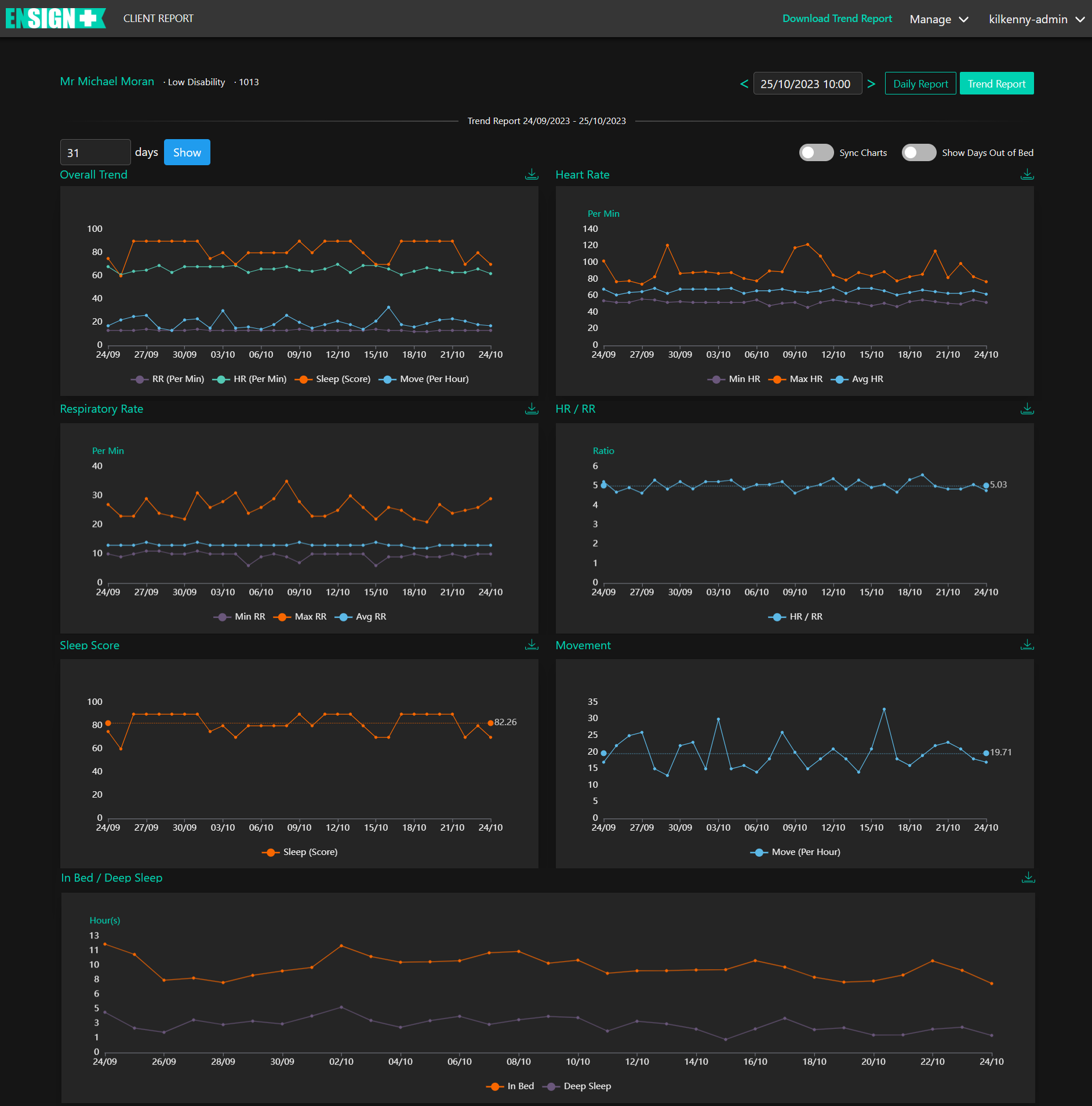
When the Trend Report opens the user will be presented with the last thirty days Trend Report for the individual client selected. This is the default view for this page and displays a variety of detailed trend reports relating to the recent activity history of the individual Client selected.
The graphs displayed are as follows:
• Overall Trend. This displays the Respiratory Rate, Heart Rate, Total Sleep and Movement records.
• Heart Rate. This displays the minimum, maximum and average heart rates.
• Respiratory Rate. This displays the minimum, maximum and average respiratory rates.
• HR / RR. This displays the Heart Rate / Respiratory Rate Ratio for each day recorded.
• In Bed / Deep Sleep. This displays the time spent in bed as compared to the total amount of
deep sleep achieved each day.
• Sleep Score. For detailed information on how Sleep Scores are calcuated, refer to the Appendix.
• Movement. Any recorded excessive movement incidents.